Tuesday, 12 March 2013

comparison between Android versions

0 comments

Android platform

Android is a software stack that includes an operating system, middleware and key applications. While Google is the main actor which comes to mind, the Open Handset Alliance also collaborates on Android's development and release. The operating system is based on the Linux kernel, the specific versions depends on the platform version and is given in the comparison table below.

Phones / Tablets

There was previously two flavors of the platform. One targeted for small screens mainly mobile phones (all versions below 3.0), and one dedicated for tablets: Honeycomb Android 3.0. However not all Android tablets support this version (some tablets use the Android 2.x).
These two variants of the platform have been merged to a versatile and uniform platform since "Ice Cream Sandwich", which has been released in October 2011. It combines "Gingerbread" and "Honeycomb" versions in a cohesive platform for tablets and phones at the same time.
The latest version of the platform is now Jelly Bean Android 4.2.2. It focuses on speed and graphics smoothness while enabling new applications like Google Beam, Google Now and a better camera app.


                for full details click here
Related Posts Plugin for WordPress, Blogger...
Continue Reading »

download and update your nokia mobile softwares

0 comments

Find Downloads for your phone
Get the latest softwares to move music, video and pictures between your Nokia and your Windows or MAC computer.
Depending on your Nokia phone, you can also update your Nokia softwareand back up your data, so whatever happens, you’ll have all your contacts, apps, maps, music and videos safely stored on your computer.

step 1- connect your nokia phone to your computer
step 2 - then click here


Continue Reading »

Thursday, 7 March 2013

How do hubs, switches, routers, and access points differ

0 comments

How do hubs, switches, routers, and access points differ


Hubs, switches, routers, and access points are all used to connect computers together on a network, but each of them has different capabilities.

Hubs

Hubs enable computers on a network to communicate. Each computer plugs into the hub with an Ethernet cable, and information sent from one computer to another passes through the hub. A hub can't identify the source or intended destination of the information it receives, so it sends the information to all of the computers connected to it, including the one that sent it. A hub can send or receive information, but it can't do both at the same time. This makes hubs slower than switches. Hubs are the least complex and the least expensive of these devices.

Switches

Switches work the same way as hubs, but they can identify the intended destination of the information that they receive, so they send that information to only the computers that are supposed to receive it. Switches can send and receive information at the same time, so they can send information faster than hubs can. If your home network has four or more computers or you want to use your network for activities that require passing a lot of information between computers (such as playing network games or sharing music), you should probably use a switch instead of a hub. Switches cost a little more than hubs.

Routers

Routers enable computers to communicate and they can pass information between two networks—such as between your home network and the Internet. This capability to direct network traffic is what gives the router its name. Routers can be wired (using Ethernet cables) or wireless. If you just want to connect your computers, hubs and switches work well; however, if you want to give all of your computers access to the Internet using one modem, use a router or a modem with a built-in router. Routers also typically provide built-in security, such as a firewall. Routers are more expensive than hubs and switches.


Access points

Access points (also called base stations) provide wireless access to a wired Ethernet network. An access point plugs into a hub, switch, or wired router and sends out wireless signals. This enables computers and devices to connect to a wired network wirelessly. Access points act a lot like cellular phone towers: you can move from one location to another and continue to have wireless access to a network. When you connect to the Internet wirelessly using a public wireless network in an airport, coffee shop, or hotel, you are usually connecting through an access point. If you want to connect your computers wirelessly and you have a router that provides wireless capability, you don't need an access point. Access points don't have built-in technology for sharing Internet connections. To share an Internet connection, you must plug an access point into a router or a modem with a built-in router.


Continue Reading »

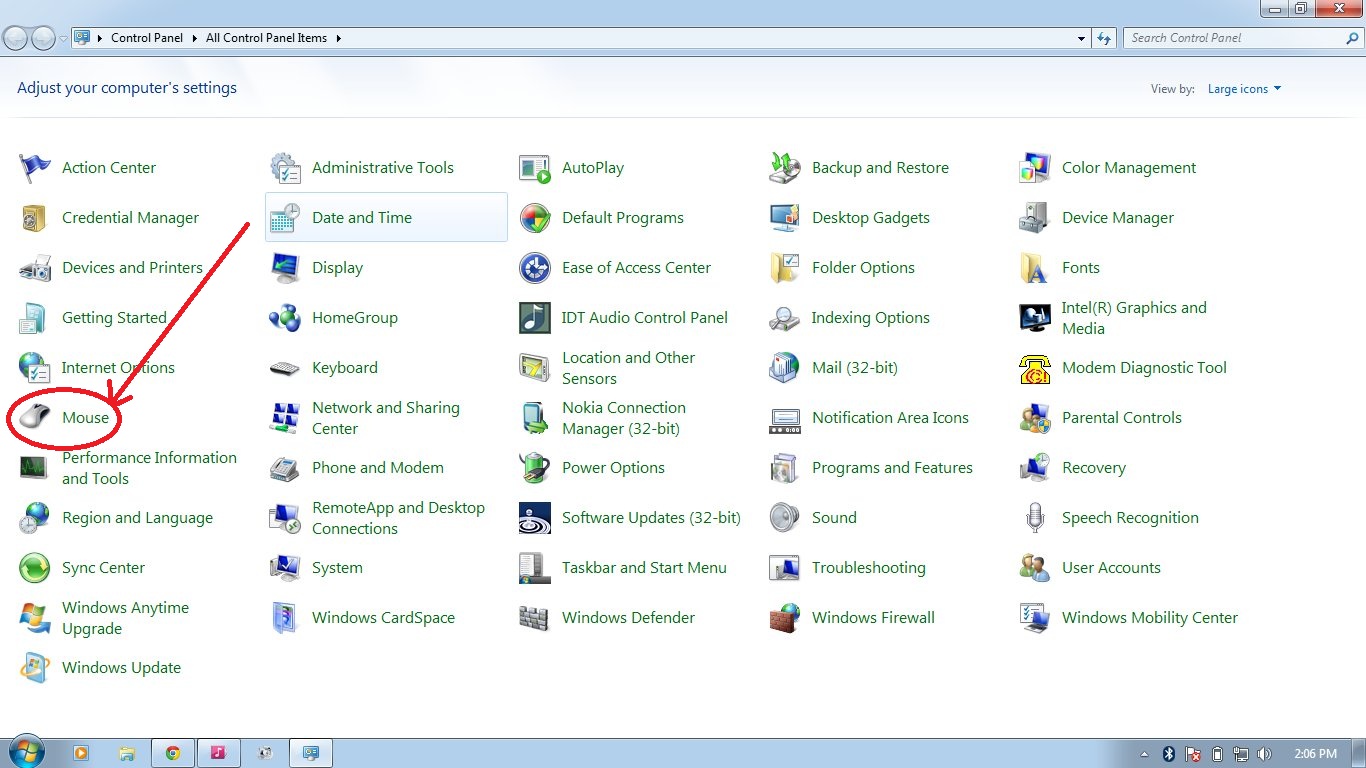
how to change mouse pointers in windows 7

0 comments

step 1 - go to desktop and click on start button


Step 2 - click on control panel then new window opened and then click on mouse


step 3 - then you will see a mini window. click on pointer


step 4 - click on browse button


step - 5 select any pointer from your mouse pointers folder


last click on apply button


Continue Reading »

like us on facebook

 
© 2013 techshelve . Designed by Making Different , provided by All Tech Buzz, Powered by Blogger